
当Newifi遇到微信公众号(4)——人脸识别
当Newifi遇到微信公众号(4)——人脸识别:
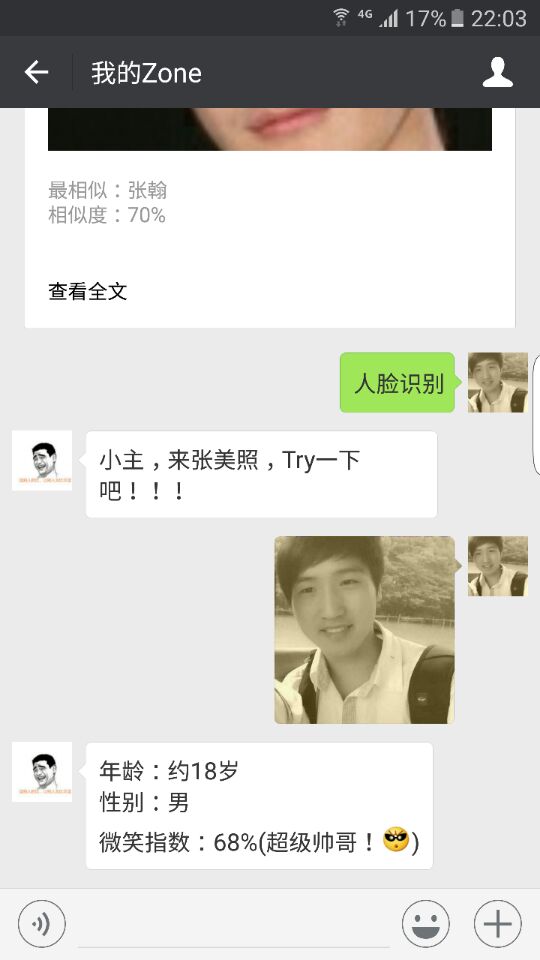
之前几篇博文我们讲到在newifi上进行公众号开发初步实现了:聊天、点播歌曲等功能,最近又加入了人脸识别功能,之后几篇博文将陆续更新人脸识别相关的功能。发挥想象,一切皆有可能。。。
本文展示通过使用第三方人脸识别接口(FACE++)实现公众号的人脸识别功能:
1、首先你需要Newifi智能路由器一台,并接入互联网(经过之前的努力,服务器插件、花生壳插件以及微信公众号平台都已经搭建好了等);
2、总结本功能涉及到的公众号接口有两种:文本和图片,主要流程是:接收文本消息->回复文本消息->接收图片事件->回复文本消息:
公众号回复文本消息结构如下(参考微信公众号开发文档):
<xml>
<ToUserName><![CDATA[toUser]]></ToUserName>
<FromUserName><![CDATA[fromUser]]></FromUserName>
<CreateTime>12345678</CreateTime>
<MsgType><![CDATA[text]]></MsgType>
<Content><![CDATA[你好]]></Content>
</xml>
| 参数 | 是否必须 | 描述 |
|---|---|---|
| ToUserName | 是 | 接收方帐号(收到的OpenID) |
| FromUserName | 是 | 开发者微信号 |
| CreateTime | 是 | 消息创建时间 (整型) |
| MsgType | 是 | text |
| Content | 是 | 回复的消息内容(换行:在content中能够换行,微信客户端就支持换行显示) |
公众号接收图片消息结构如下(参考微信公众号开发文档):
<xml>
 <ToUserName><![CDATA[toUser]]></ToUserName>
 <FromUserName><![CDATA[fromUser]]></FromUserName>
 <CreateTime>1348831860</CreateTime>
 <MsgType><![CDATA[image]]></MsgType>
 <PicUrl><![CDATA[this is a url]]></PicUrl>
 <MediaId><![CDATA[media_id]]></MediaId>
 <MsgId>1234567890123456</MsgId>
 </xml>
| 参数 | 描述 |
|---|---|
| ToUserName | 开发者微信号 |
| FromUserName | 发送方帐号(一个OpenID) |
| CreateTime | 消息创建时间 (整型) |
| MsgType | image |
| PicUrl | 图片链接 |
| MediaId | 图片消息媒体id,可以调用多媒体文件下载接口拉取数据。 |
| MsgId | 消息id,64位整型 |
事件处理分支:
public function responseMsg()
{
    $postStr = $GLOBALS["HTTP_RAW_POST_DATA"];  //获取事件类型
    if (!empty($postStr)){
        $postObj = simplexml_load_string($postStr, 'SimpleXMLElement', LIBXML_NOCDATA);
        $RX_TYPE = trim($postObj->MsgType);
        switch($RX_TYPE)  //针对不同事件,调用相应函数处理
        {
            case "text":
                $resultStr = $this->handleText($postObj);  //文本事件处理
                break;
            case "image":
                $resultStr = $this->handleImage($postObj);  //图片事件处理
                break;
            default:
                $resultStr = "Unknow msg type: ".$RX_TYPE;
                break;
        }
        echo $resultStr;
}
文本事件处理:
public function handleText($postObj)
{
    $fromUsername = $postObj->FromUserName;
    $toUsername = $postObj->ToUserName;
    $keyword = trim($postObj->Content);
    $time = time();
    $textTpl = "<xml>
                    <ToUserName><![CDATA[%s]]></ToUserName>
                    <FromUserName><![CDATA[%s]]></FromUserName>
                    <CreateTime>%s</CreateTime>
                    <MsgType><![CDATA[%s]]></MsgType>
                    <Content><![CDATA[%s]]></Content>
                    <FuncFlag>0</FuncFlag>
                    </xml>";
    if(!empty( $keyword ))
    {
        if( $keyword == "人脸识别" ){   //判断关键字
            $msgType = "text";      //回复文本消息
            $contentStr = "小主,来张美照,Try一下吧!!!";  //回复文本消息内容
            $resultStr = sprintf($textTpl, $fromUsername, $toUsername, $time, $msgType, $contentStr);
            echo $resultStr;
        }
    }
}
图片事件处理:
public function handleImage($postObj)
{
    $fromUsername = $postObj->FromUserName;
    $toUsername = $postObj->ToUserName;
    $picUrl = $postObj->PicUrl;
    $time = $postObj->CreateTime
    $str=file_get_contents("http://www.gongkong-maker.com/wx_face.php?pic=$picUrl");  //引入FACE++人脸识别接口,获取面部识别结果
    $contentStr = $str;
    $resultStr = $this->responseText($postObj, $contentStr);  //调用文本消息回复函数responseText()
    return $resultStr;
}
public function responseText($object, $content, $flag=0)
{
    $textTpl = "<xml>
                    <ToUserName><![CDATA[%s]]></ToUserName>
                    <FromUserName><![CDATA[%s]]></FromUserName>
                    <CreateTime>%s</CreateTime>
                    <MsgType><![CDATA[text]]></MsgType>
                    <Content><![CDATA[%s]]></Content>
                    <FuncFlag>%d</FuncFlag>
                    </xml>";
    $resultStr = sprintf($textTpl, $object->FromUserName, $object->ToUserName, time(), $content, $flag);  //回复面部识别结果
    return $resultStr;
}
引入FACE++人脸识别接口:
wx_face.php(外行人写的代码,PHP几乎零基础,莫见笑):
<?PHP
header("Content-Type: text/html; charset=UTF-8");

$picUrl = $_GET[pic]; //获取用户上传图片链接
echo app($picUrl );  //调用app函数获取回复内容

function app($picUrl );
{
    require_once 'wx_face_sdk.php';  //引入FACE++sdk
    $facepp = new Facepp();
    #detect image by url
    $params = array('url'=>$picUrl);
    $response = $facepp->execute('/detection/detect',$params);  //通过FACE++sdk获得面部识别结果

    if($response['http_code']==200){  //对返回结果数据处理
        #json decode
        $data = json_decode($response['body'],1);
        $face = $data['face'];
        $size = sizeof($face);
        $age = $face[0]['attribute']['age']['value'];
        if ($face[0]['attribute']['gender']['value'] == "Female") {
            $gender = "女";
            $describe = "才更漂亮哦!/::)";
            $des = "绝世美女!/::B";
        }else {
            $gender = "男";
            $describe = "才更帅气哦!/::)";
            $des = "超级帅哥!/::+";
        }
        $desNum = ceil($face[0]['attribute']['smiling']['value']);
        if ($desNum < "50") {
             $smil = "要保持微笑";
             $smil_des = "";
        }else {
             $smil = $des;
             $describe = "";
             $smil_des = $des;
        }
        print_r("年龄:约".$age."岁"."\n"."性别:".$gender."\n"."微笑指数:".$desNum."%(".$smil.$describe.")");  //最后获得回复给用户的内容
    }
}
?>
wx_face_sdk.php:
<?PHP
/**
* Face++ PHP SDK
* author: Tianye //这里借用这位大神的源码,感谢!!!
* since:  2013-12-11
**/
class Facepp{
    ######################################################
    ### If you choose Amazon(US) server,please use the                         ###
    ### http://apius.faceplusplus.com/v2                                                  ###
    ### or                                                                                                   ###
    ### https://apius.faceplusplus.com/v2                                                ###
    ######################################################
    var $server = 'http://apicn.faceplusplus.com/v2';  //国内用这个接口
    #var $server = 'https://apicn.faceplusplus.com/v2';
    #var $server = 'http://apius.faceplusplus.com/v2';
    #var $server = 'https://apius.faceplusplus.com/v2';

    #############################################
    ### set your api key and api secret here.                         ###
    #############################################  //在此处设置你的api_key和api_secret,通过FACE++开发者中心注册获得
    var $api_key = 'your api key ';
    var $api_secret = your api secret ';
    var $attribute = 'gender,age,race,smiling';

    public function __construct($api_key=NULL, $api_secret=NULL, $attribute=NULL, $server=NULL){
        if($api_key){
            $this->api_key = $api_key;
        }
        if($api_secret){
            $this->api_secret = $api_secret;
        }
        if($attribute){
            $this->attribute = $attribute;
        }
        if($server){
            $this->server = $server;
        }
    }
    /**
    * @param $method : The Face++ API
    * @param $params : Request Parameters
    * @return : Array {'http_code':'Http Status Code', 'request_url':'Http Request URL','body':' JSON Response'}
    **/
    public function execute($method,$params){
        if(empty($params)){
            $params=array();
        }
        $params['api_key'] = $this->api_key;
        $params['api_secret'] = $this->api_secret;
        //$params['attribute'] = $this->attribute;

        return $this->request("{$this->server}{$method}",$params);
    }
    private function request($request_url , $request_body){
        $useragent = 'Faceplusplus PHP SDK/1.0';
        $curl_handle = curl_init();
        curl_setopt($curl_handle, CURLOPT_URL, $request_url);
        curl_setopt($curl_handle, CURLOPT_FILETIME, TRUE);
        curl_setopt($curl_handle, CURLOPT_FRESH_CONNECT, FALSE);
        curl_setopt($curl_handle, CURLOPT_CLOSEPOLICY, CURLCLOSEPOLICY_LEAST_RECENTLY_USED);
        curl_setopt($curl_handle, CURLOPT_MAXREDIRS, 5);
        curl_setopt($curl_handle, CURLOPT_HEADER, FALSE);
        curl_setopt($curl_handle, CURLOPT_RETURNTRANSFER, TRUE);
        curl_setopt($curl_handle, CURLOPT_TIMEOUT, 5184000);
        curl_setopt($curl_handle, CURLOPT_CONNECTTIMEOUT, 120);
        curl_setopt($curl_handle, CURLOPT_NOSIGNAL, TRUE);
        curl_setopt($curl_handle, CURLOPT_REFERER, $request_url);
        curl_setopt($curl_handle, CURLOPT_USERAGENT, $useragent);
        if (extension_loaded('zlib')){
            curl_setopt($curl_handle, CURLOPT_ENCODING, '');
        }
        curl_setopt($curl_handle, CURLOPT_POST, TRUE);
        if(array_key_exists('img',$request_body)){
            $request_body['img'] = '@'.$request_body['img'];
        }else{
            $request_body=http_build_query($request_body);
        }
        curl_setopt($curl_handle, CURLOPT_POSTFIELDS, $request_body);
        $response_text = curl_exec($curl_handle);
        $reponse_header = curl_getinfo($curl_handle);
        curl_close($curl_handle);
        return array('http_code'=>$reponse_header['http_code'],'request_url'=>$request_url,'body'=>$response_text);
    }
}
3、我的公众号:我的Zone(chen244970717)
还没有人抢沙发呢~